App
Putting MCW on your Android phone or iPhone home screen
By MCW Login BD editorial deskPublished Updated
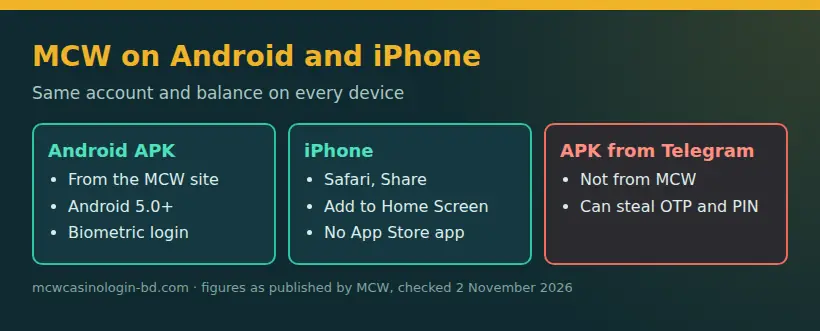
The MCW Casino app for Android is a free APK from the MCW site for Android 5.0 or newer, not a Google Play app; on iPhone, add the MCW site to your home screen from Safari. Both options use the same MCW account and balance as the mobile browser.
01 · App
Compare MCW Casino app options
Choose how to access MCW
| Option | Source | What you get | Notes |
|---|---|---|---|
| Android APK | The MCW site | An Android app | Free; Android 5.0 or newer; not on Google Play |
| iPhone home-screen shortcut | MCW opened in Safari | A shortcut to the site | No App Store app; add it from Safari’s Share menu |
| Mobile browser | The MCW site in your browser | The mobile site | No APK installation; uses the same account and balance |
Choose the APK if you want the Android app, the Safari shortcut for quick iPhone access, or the browser if you prefer not to install anything. See the MCW app guide for related access information.
02 · App
Check the MCW Casino APK source
Use the MCW site
Get the mcw casino apk from the MCW site, not from Google Play. APK files sent through Telegram or offered by file-sharing sites are not from MCW. A familiar name or logo does not establish that a file came from the operator. If you need to find the current MCW site, use the links MCW publishes through its own channels rather than a forwarded download.
03 · App
Install the MCW casino APK on Android
Follow the install steps
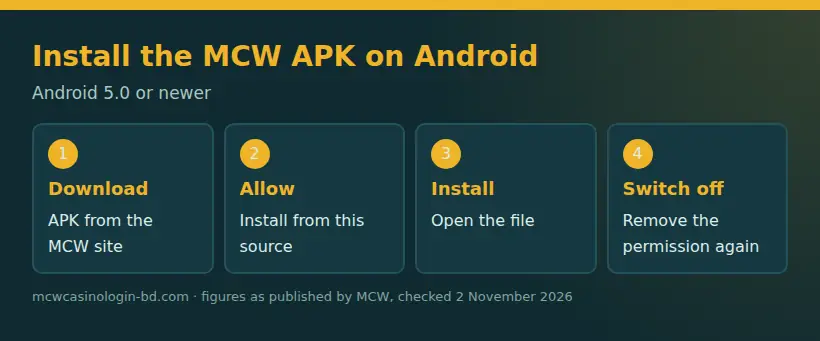
The MCW APK is free for Android 5.0 or newer. Allow installation from the browser you use to download it, open the APK file, complete installation and switch that permission off again.
- Open the MCW site in your Android browser and download the APK from there.
- When prompted, allow that browser to install apps from this source in Android settings. The setting label can vary by device.
- Open the downloaded APK file and follow the installation prompts.
- After installation, return to the same permission setting and turn off permission to install from that source.
If Android blocks the file, check that your device meets the version requirement and that permission is enabled for the browser used to download it. Avoid installing a file from a message or file site instead.
04 · App
Add MCW to your iPhone home screen
Create the Safari shortcut
MCW has no iPhone App Store app. Open the MCW site in Safari, tap Share, and choose Add to Home Screen. Confirm the shortcut, then open it from your home screen to reach MCW. This creates a way to open the site; it is not an iPhone APK or a separate App Store application. You can also use MCW in Safari without adding the shortcut.
05 · App
Open the MCW app and log in
Use your existing account
The app and mobile site use the same MCW account and balance. Sign in with your username and password; use your phone number as the username only if you set it that way. If you are new, start with the registration guide. MCW is for adults aged 18 and over, with one account per person.
Biometric login is available in the Android app. After signing in, use it if you prefer; you can still access the account with your username and password. Before withdrawing, MCW may request identity or address documents, usually as part of verification. Use a payment account in your own name. See the deposit and withdrawal guide for payment details and the login guide for account access help.
06 · App
Fix MCW app problems
Check common errors and remove suspicious files
| Problem | Possible cause | Fix |
|---|---|---|
| APK will not install | Android is older than 5.0 or browser permission is off | Check the Android version and allow installation for the browser you used |
| Login is rejected | Incorrect username or password, caps lock, or account locked after wrong attempts | Recheck your details; use password reset by registered email or contact support if locked |
| MCW page does not load | You opened an old or fake address | Return to the MCW site through its own published links |
| Biometric login fails | Biometric access is unavailable for that sign-in | Sign in with your username and password |
If you downloaded a suspicious APK from Telegram or a file site, do not open it; delete it from Downloads. If you installed it, remove it through Android’s app settings and switch off the browser’s install-from-source permission. For account help, use the site’s 24/7 live chat or the contact page.
07 · App
Keep the MCW app current and secure
Get updates from MCW
When you want an app update, return to the MCW site and follow the download instructions shown there. Do not install an update file forwarded through Telegram or hosted on a file-sharing site. Keep the install-from-source permission off except when you need it to install an APK, then switch it off again. You can also use the mobile browser instead of installing an update. MCW’s account includes deposit limits, time-out and self-exclusion tools; find more about these in the responsible gambling guide.
98 of 2026), in force in Bangladesh since 1 July 2026, covers online gambling and betting, including access through apps, mirror sites and VPN. In Bangladesh, casino apps and mirror access for money play are covered by the Gambling Prevention Act, 2026, in force since 1 July 2026.
FAQ
App and APK questions
How do I download the MCW casino app?
The MCW Casino app for Android is a free APK from the MCW site; download it there, then permit installation for your browser and turn that permission off afterward.
Is MCW casino APK download available on Google Play?
No. MCW does not provide its Android app through Google Play; use the APK from the MCW site, and avoid copies shared through Telegram or file sites.
How do I install MCW casino APK on Android?
On Android 5.0 or newer, download the APK from the MCW site, allow your browser to install it, open the file, then switch that permission off.
How do I use MCW app iOS?
There is no iPhone App Store app. Open MCW in Safari, tap Share, choose Add to Home Screen, then launch the saved shortcut.
Do MCW casino apps share the same account and balance?
Yes. The MCW app and mobile site use the same account and balance, so sign in with your username and password rather than creating another account.