Sign up
Opening an MCW account in taka step by step
By MCW Login BD editorial deskPublished Updated
You register at MCW Casino with the Sign Up button: enter a username, password and BDT currency first, then your full name as it appears on your ID, mobile number and email. You must be 18 or older, use one account only, and provide details that match your documents and payment account.
01 · Sign up
MCW Casino sign up: who can register
Check eligibility before registering
You can register if you are at least 18 and are not in a country restricted by MCW’s terms. MCW lists Austria, France, Germany, the Netherlands, Spain, Comoros, the United Kingdom, the USA and FATF-blacklisted countries as restricted. The restriction applies to access to MCW, not just to creating an account.
MCW allows one account per person. Do not create another account if you already have one, even if you have forgotten your login details; use the login help guide to find the account-recovery steps instead. Registration information should be accurate because MCW may check your identity and payment details later. For account settings and limits, see the responsible gambling page.
02 · Sign up
Prepare your MCW Casino account details
Gather your ID and payment details
Before you start, have your National ID card (NID) or passport nearby, along with a mobile number you can access and an email address. Use your full name as printed on your ID. The name must also match the account you use to deposit, because MCW accepts deposits only from accounts in your own name.
If you expect to deposit through bKash, Nagad or Rocket, prepare a wallet registered in your name. Do not use another person’s wallet, even if they have agreed to send the payment for you. MCW may request a passport, driving licence or National ID card for identity checks, and may also request a utility bill or bank statement for address verification. You can read about supported payment steps on the deposit and withdrawal guide.
03 · Sign up
Open the MCW Casino registration form
Follow the sign-up steps
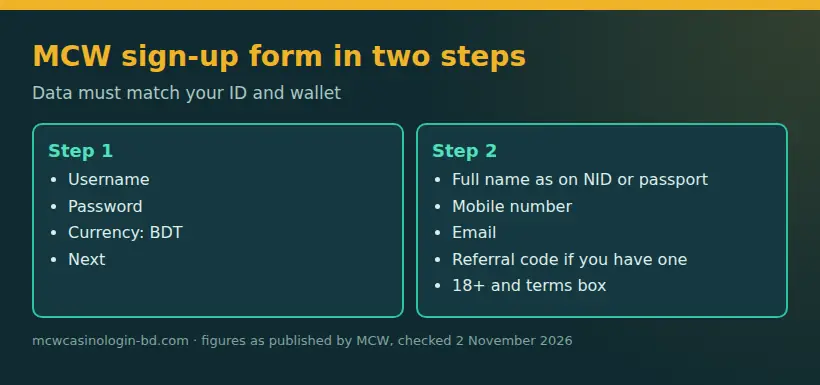
Use the Sign Up button on the MCW site. Registration has two stages, so complete both before trying to deposit:
- Enter a username and password, select BDT as the currency for a Bangladesh account, then click Next. Check the spelling of your username and choose a password you can enter correctly later.
- Enter your full name as shown on your ID, your mobile number and your email address. Add a referral code in the field provided if you have one.
- Confirm that you are 18 or older and accept the terms, then submit the details and follow the phone-verification prompt.
Your account currency is set during sign-up. Choose BDT rather than another listed currency if you want the account balance and cashier to use Bangladeshi taka. If you need the full registration path again, the MCW sign-up page guide outlines the same process. Do not enter a promotional bonus code as though it were a referral code: MCW says promo codes belong on the promotion page, or at deposit when the promotion asks for one.
04 · Sign up
Verify your phone number
Enter the five-minute code
A verified phone number is needed before you can receive a first-deposit bonus. When MCW sends the verification code, enter it in the verification field within five minutes; the code expires after that period. Keep the registration page open while you retrieve the message, and make sure the number you entered is the one you can access.
If the code expires, request another code through the on-screen verification process and enter the new one before its validity period ends. Check that the number was typed correctly before retrying. Do not share a verification code with another person. Phone verification confirms access to your number; it does not replace identity checks, which may be requested separately.
05 · Sign up
Add a referral code or find yours
Enter or share a referral code
If someone gave you a referral code, enter it in the referral field during the personal-details stage of registration. You can leave that field empty if you do not have a code. Do not guess a code or use a promotional code in this field; MCW referral codes and promotion codes serve different purposes.
After you have an account, find your own code by opening My Account and choosing Referral. From there, MCW provides your referral code or link to share. The referral menu is where you retrieve your details; it is not a place to add a code to an account that has already been registered. For promotional offers, use the relevant promotion page and read the conditions before making a deposit.
06 · Sign up
Complete KYC and match your details
Know when documents may be requested
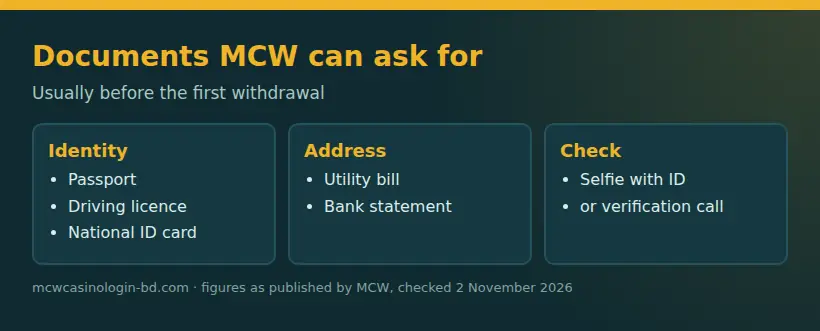
MCW may request identity documents as part of KYC, usually before a withdrawal. Documents it may ask for include a passport, driving licence or National ID card. For proof of address, it may request a utility bill or bank statement. MCW may also ask for a selfie with your ID or conduct a verification call.
Use the same name across your registration details, ID and payment account. If the name or other personal information is wrong, contact MCW support rather than opening a second account to correct it. Live chat is available on the site and in the app; MCW also aims to reply to support emails within two hours. KYC checks can take place after sign-up, so completing the form does not mean that you will never be asked for documents.
07 · Sign up
Choose a deposit bonus before paying
Select an offer before sending money
Choose a promotion before you pay: the deposit steps ask you to select a promotion or none before sending funds. At the fact-check on 2 November 2026, MCW published a first-deposit offer of 100% up to ৳700 with 10x turnover on the deposit plus bonus. The published qualifying minimum varied from ৳500 to ৳700 depending on the offer. These figures can change; the current terms and amount appear on the deposit or promotion page.
The offer is not a requirement for opening an account. Read its turnover and eligibility conditions before selecting it, and confirm that your phone is verified if you intend to claim a first-deposit bonus. For example, the published 10x condition applies to the combined deposit and bonus amount, not only to the bonus. To see the available offers and their terms, use the bonus guide. Complete payment from a wallet in your own name and follow the cashier’s instructions for your chosen channel.
08 · Sign up
Avoid common MCW registration mistakes
Fix errors before depositing
Check your entries before submitting. These common errors can delay verification or cause a deposit problem:
| Mistake | Result | Fix |
|---|---|---|
| Name differs from your ID or wallet | MCW may not match the account to your documents or accept the payment | Enter the name shown on your ID and use a payment account in that name |
| Creating a second account | This conflicts with MCW’s one-account-per-person rule | Recover access to your existing account instead of registering again |
| Selecting a currency other than BDT | Your account is set up in the wrong currency for a Bangladesh account | Select BDT during the first registration step |
| Entering an expired phone code | The five-minute verification code no longer works | Request a new code and enter it within five minutes |
| Paying before choosing a promotion | The intended offer may not be attached to the deposit | Select the offer or choose none before paying |
After sign-up, new MCW members start at Bronze in the VIP programme. You do not need to choose a tier during registration. Keep your login details and account information consistent when you later use the MCW app guide or access the site through a mobile browser. 98 of 2026) has been in force since 1 July 2026 and covers online gambling and betting, including access through apps, mirror sites and VPN. In Bangladesh, opening an account for online stakes falls under the Gambling Prevention Act, 2026, in force since 1 July 2026.
FAQ
Sign-up and registration questions
How do I complete MCW Casino sign up in Bangladesh?
Use the Sign Up button, enter a username, password and BDT, then provide your ID name, mobile number and email and verify your phone.
What do I need for MCW Casino registration?
Prepare an NID or passport, an accessible mobile number, an email address and, for deposits, a bKash, Nagad or Rocket account in your name.
Where do I enter an MCW Casino referral code?
Enter a referral code in the field during the personal-details stage of registration; find your own later under My Account, then Referral.
How long is the MCW Casino phone verification code valid?
The phone verification code is valid for five minutes. If it expires, request another through the verification prompt and enter the new code promptly.
Can I create a second MCW Casino account?
No. MCW allows one account per person, so recover access to your existing account rather than registering again if you cannot log in.